← Work · Accessibility evaluation · Instrument design · Technical writing
Website Accessibility Evaluation
An 11-barrier, 196-item evaluation of a live public website, testing the instrument as much as the site.
Undetected Barriers
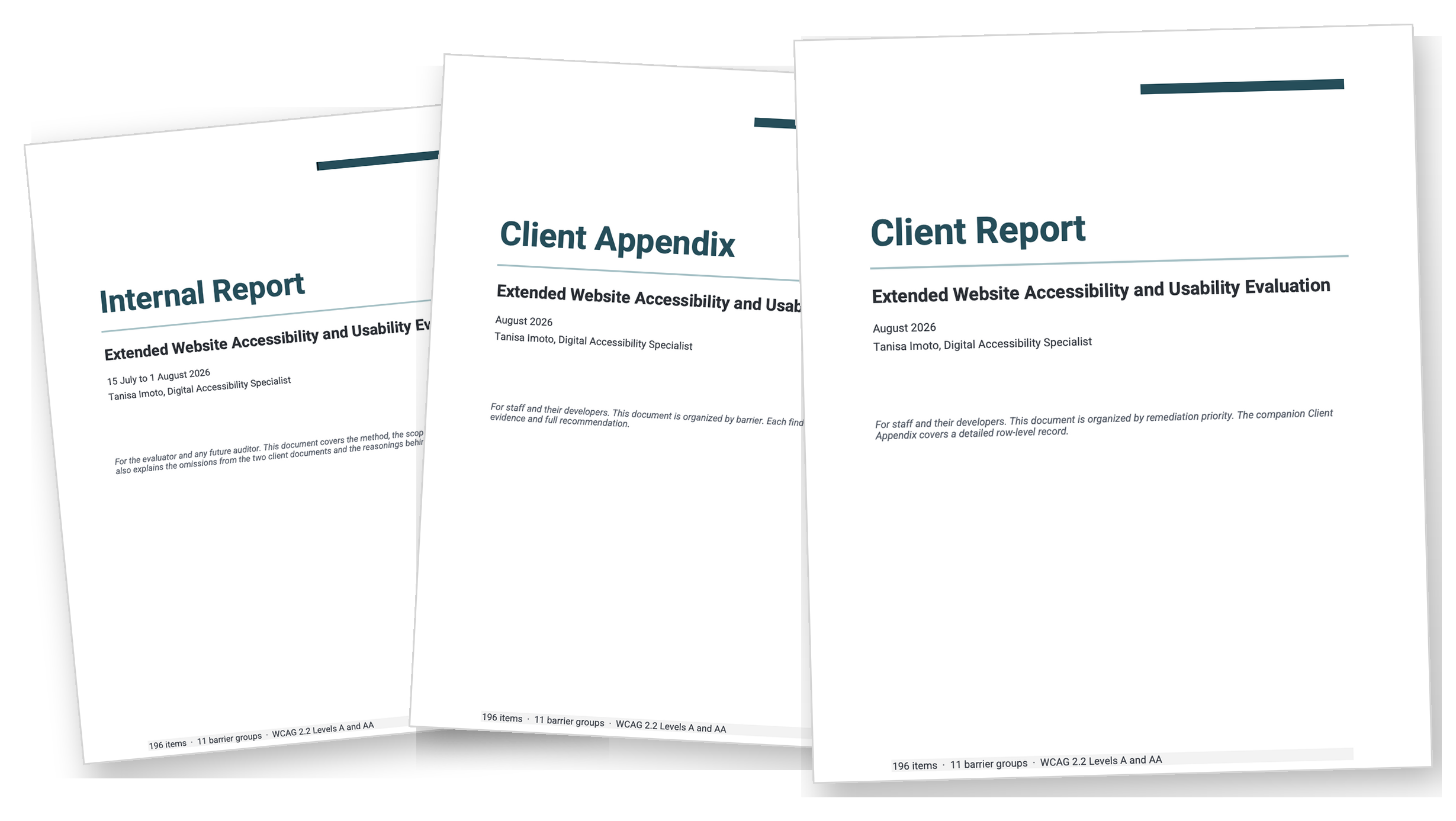
This evaluation reviews a live public website against 196 items, grouped under the 11 most common accessibility barriers on the web, across 11 pages and one published 45-page document. I designed the scoring conventions, ran the evaluation, and wrote three documents including, an internal report, a client report, and a client appendix.
In one scenario, a blind member opens the website and hears "INFOCARDSPOTLIGHT 345X195 px (1) dot p n g." Twenty-one more images announce themselves by reading out their file name. Because each one of them has an alt attribute, the rule passes and the automated scan reported a clean result on all 22. In other words, the automated scan checks whether an alt attribute exists. It does not read the text inside it.
In another scenario, a member whose sign-in fails sees a red message appear beside the field. The region that would announce that message is empty, so a member using a screen reader does not hear anything. An automated check can confirm that a region exists. However, confirming that a screen reader announces the message takes a person. The automated scan therefore reports no failure.
Despite these examples, a membership organization for children's book creators cannot tell the extent to which its website prevents members from using it. While staff learn something is wrong when a member reaches out to share a poor experience, they are unlikely to know how far the problem reaches or how to apply a constrained budget to the most critical issues on the website.
More on the barriers
While staff cannot answer how far either scenario goes, this evaluation found that the images in the first scenario have the widest reach within the website. Furthermore, the automated scan only detects one of the three kinds of failure related to those images.
Descriptions Without Meaning
Roughly 22 images show their upload filename as the description,
including file extension. The infographic on the homepage shows
alt="Infographic.png", where a complex image needs a short
description and an extended description underneath it. The hero
shows alt="Landing Page Hero Image", which describes the slot the
image occupies, but not the image itself. These 22 are the clearest
evidence in the evaluation for manual review.
Missing Descriptions
The header logo and the footer logo, as well as the mobile menu image, do not declare an alt attribute at all. This is the one kind of failure the automated scan reports. It found 3 image problems on the homepage while the manual pass found 25.
Unmarked Decorative Images
On the home page, there are no images that declare alt="". More
specifically, there are no aria-hidden, role, or title
declarations on any SVG on any page. That covers roughly 20 chevron
icons repeated across every card, the social icons, and the
hamburger glyph. A screen reader announces each of them as an
element without a name.
The sign-in failure in the second scenario has one cause which is also the reason that a script fails to find it. Three Confirmation Routes records how both scenarios were discovered and how each finding was validated.
The 196-Item Instrument
- Items
- 196
- Barrier categories
- 11
- Items outside WCAG
- 54
The instrument pairs accessibility criteria with related usability heuristics, grouped under the most common accessibility barriers on the web. The 54 items outside WCAG are considerations that go further than the standard requires, such as whether a label matches its action and whether an error message assigns fault to the reader.
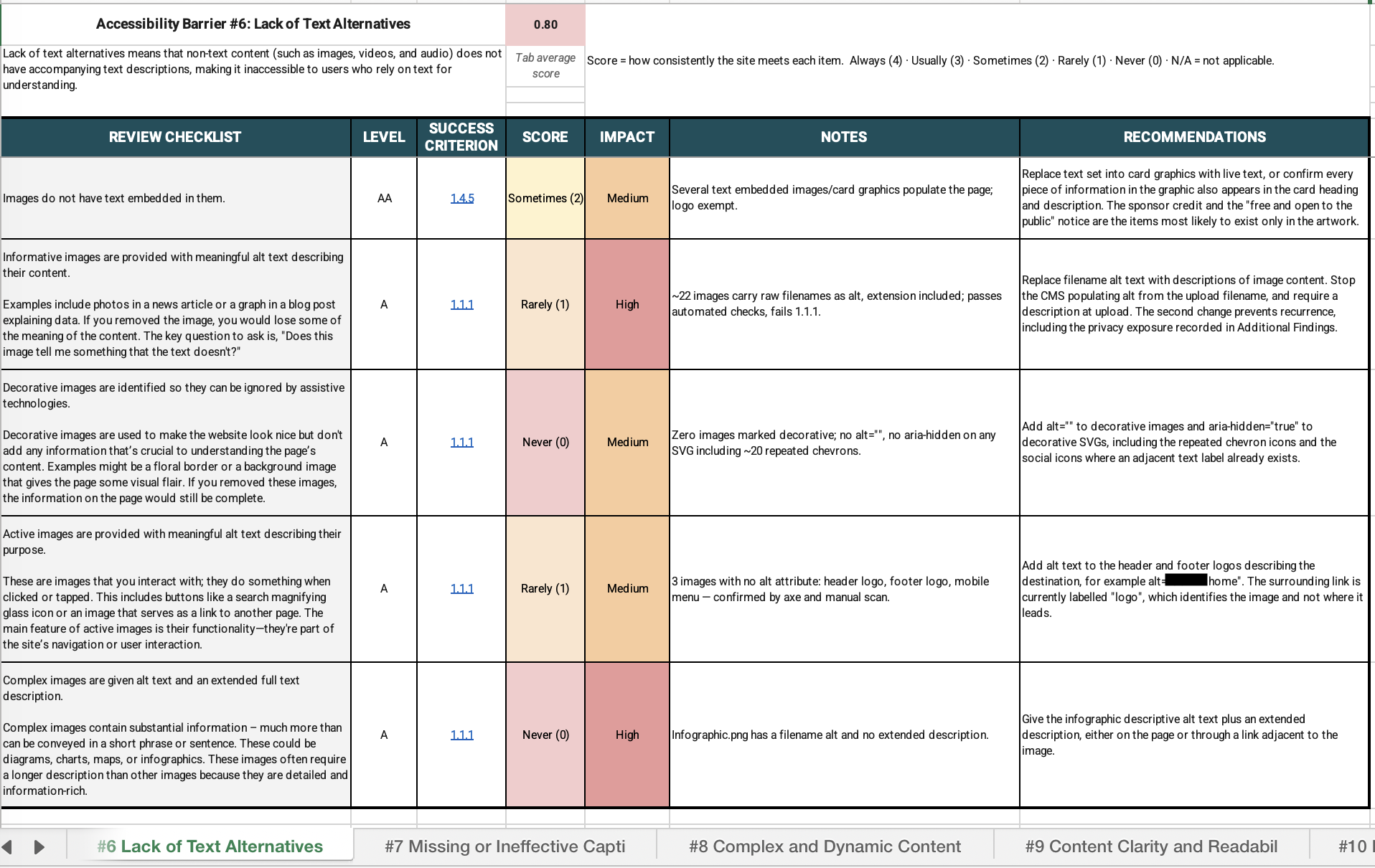
The audit workbook open on barrier 6, Lack of Text Alternatives, with five scored rows and a tab average of 0.80.
The tab defines the barrier as non-text content lacking accompanying text descriptions, which makes it inaccessible to anyone relying on text. Score records how consistently the site meets each item, from Always (4) down to Never (0), with N/A excluded from averages. Five items are scored, each with its WCAG level, success criterion, score, impact, evidence, and recommendation. Tabs for barriers 6 through 10 are visible along the bottom of the window, part of eleven in the instrument.
| Item | Level | Criterion | Score | Impact |
|---|---|---|---|---|
| Images do not have text embedded in them | AA | 1.4.5 | Sometimes (2) | Medium |
| Informative images have meaningful alt text | A | 1.1.1 | Rarely (1) | High |
| Decorative images are identified as decorative | A | 1.1.1 | Never (0) | Medium |
| Active images have meaningful alt text | A | 1.1.1 | Rarely (1) | Medium |
| Complex images have alt text and an extended description | A | 1.1.1 | Never (0) | High |
I ran the instrument on a live public website so the findings would come from a site in use. The evaluation was self-directed, and I withheld the organization's name to respect its privacy.
Score records how consistently the website meets an item. Impact rates the harm to a user when the website fails that item, as High, Medium, or Low. Read together, the two columns show how often a failure occurs and how much it affects users. The pairing sets the remediation priority.

Two scored rows from the audit workbook, including the finding that 22 images use their own filenames as descriptions.
The first row scores the embedded-text criterion 1.4.5 at Level AA as Sometimes (2) with Medium impact, noting that text-embedded card graphics populate the page and that the logo is exempt. The recommendation is to replace text set into card graphics with live text, or to confirm that every piece of information in the graphic also appears in the card heading and description. The second row scores the informative-images criterion 1.1.1 at Level A as Rarely (1) with High impact. Its evidence records roughly 22 images whose alt text is the raw filename including the extension, which passes automated checks and fails 1.1.1. The recommendation is to replace filename alt text with descriptions of image content, and to stop the content management system populating alt from the upload filename so the defect cannot recur.
The sheet defines an informative image in plain language on the respective row. An evaluator does not need a separate manual to score it.
Each item score feeds a barrier average, and the 11 barrier averages produce the overall figure. Three rules determine which scores enter those averages and how high any one item can score. A pass seen on sampled pages caps at Sometimes because the top two grades are reserved for proof that a mechanism works across the whole website. Since a website should not be scored on a pattern that does not exist, rows marked not applicable are excluded, not counted as zero. To avoid reporting the same failure twice, a single defect is scored on one tab only.
The sampling rule lowered the highest score this evaluation could produce. Only 3 rows cleared the site-wide bar, which left Sometimes as the practical ceiling for the other 159 and 2.04 as the maximum total. A reader who assumes the scale runs to 4 may interpret the final figure as a failed website. The three documents therefore state the 2.04 ceiling before they report the score.
More on the instrument
The overall figure is the average of the 11 barrier scores instead of the average of all 162 items. So, each barrier counts for one eleventh of the total, whatever its size. Barrier 2 reached that total on 3 scored items and barrier 10 on 45, and both moved it by the same amount. Since weighting the average by item count would produce a different number, the equal weighting is stated in every document from this evaluation.
A score is a consistency index and not a conformance percentage. The figure records how consistently the website met each item across the examined pages. The evaluation does not make a WCAG conformance claim on its own.
A large share of the instrument's items are Not Applicable. Of the 196 items, 34 of them did not receive a score and 47 of them did not receive an impact rating. Where there is no data table, video, or other instance of the pattern in question, that row takes N/A.
The 54 items outside WCAG are the usability layer. They ask whether a label matches the action it performs, whether an error message assigns fault to the reader, and whether a control's name matches the words printed on it. A website can satisfy every success criterion and still fail all three.
Three Confirmation Routes
Every finding comes from one of two sources. Direct inspection produces a measured value, such as an attribute, a computed color, or the contrast ratio between two of them, and it is checked by running the command again in the browser's developer tools. Knowing the standards reveals which requirement that value fails. Reading the criterion allows confirmation of the judgment. These recorded sources allow others, such as developers, to test any finding.
Three routes justify each claim, including a script, an independent tool, and a manual check. All three routes are available in the workbook's Verification Commands tab. They are keyed by tab and row so another evaluator can replicate them.
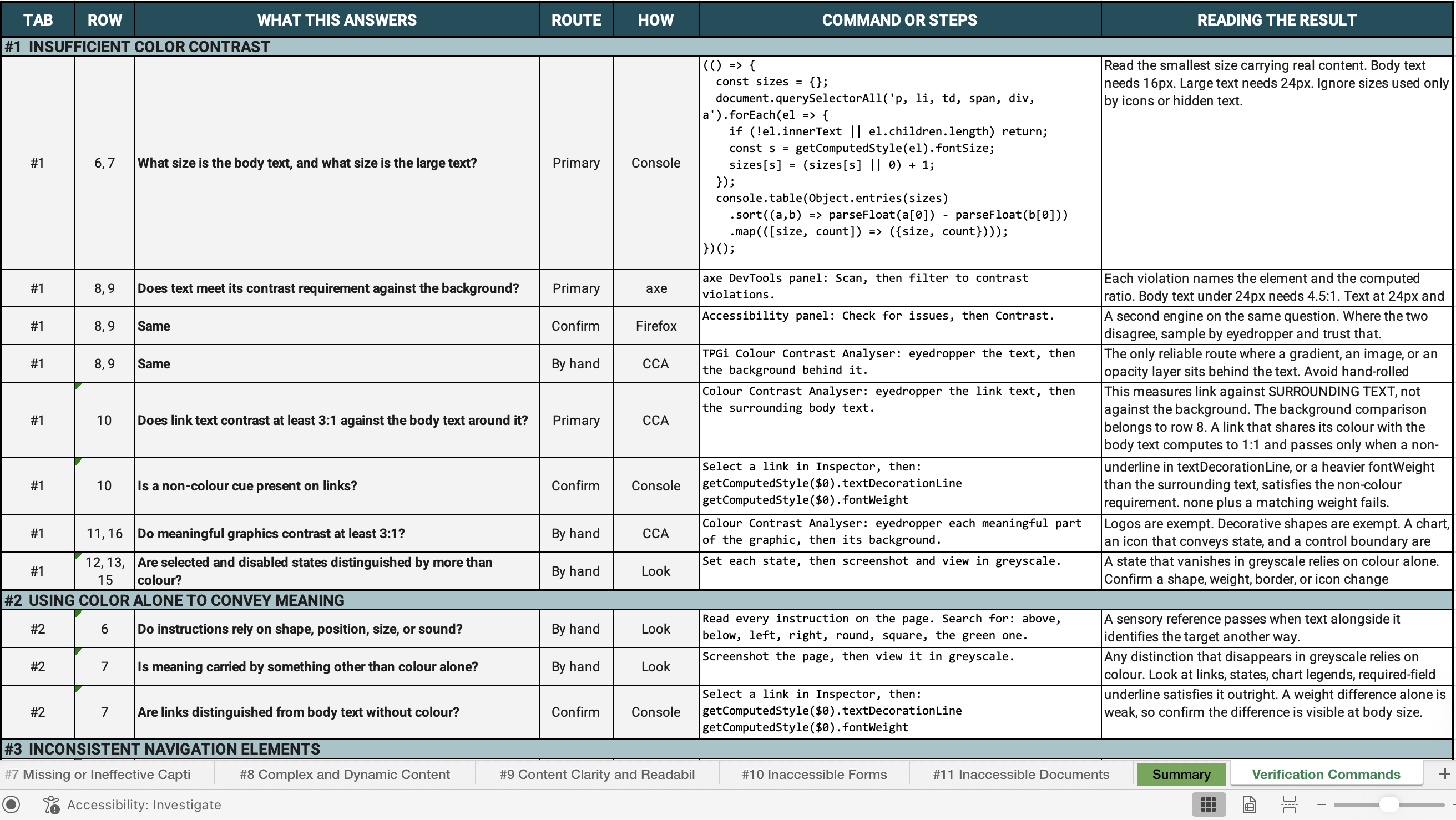
The Verification Commands tab of the audit workbook. Each row has one way to check one finding, with columns for the barrier tab and row where it is recorded, the question it answers, the route, the tool, the command or steps, and how to read the result. A question can have more than one row. The contrast question has three, one through axe DevTools, one through the Firefox Accessibility panel, and one by hand through the TPGi Colour Contrast Analyser.
A script cannot produce three classes of evidence. Composited color over a scrim needs an eyedropper. Reading order in a tagged document needs a screen reader. Finally, listening reveals whether a live region speaks.
More on the confirmation routes
The manual route found the most serious failure in the evaluation. Six regions on the sign-in page declare a live role with all six empty. A failed sign-in leaves a member who cannot see the screen guessing the cause. Yet, every automated check passes because a script confirms the region exists and that it declares the correct role. Only listening revealed that the message reaches the screen and stops there.
The eyedropper established two contrast readings. A ratio computed from declared color values describes the colors an author wrote, while a ratio measured from the pixel on screen describes the colors a user sees. The two can differ. Where a shadow, a gradient, or a semi-transparent overlay sits on top of the text, the declared value can pass while the rendered value, which is the one a user experiences, fails.
Repository access was consistently unavailable. The inability to read the website's code resulted in findings drawn entirely from the page as the browser builds it. Each recommendation therefore gives the markup currently in place and its replacement, identified by structure not by location in the codebase. Where a developer might reach for a simpler but unsustainable fix, the recommendation explains why it fails.
The Retracted Findings
Five readings made it into the scored workbook, but were removed before writing the report. Four of these failed for the same reason. In each case I had read markup supplied by the website's framework as markup its developers wrote.
One of the four readings shows the pattern. I recorded the website as having a skip link, which is the control that lets a keyboard user jump past the navigation. I had actually found a styling rule the framework ships so that a skip link stacks correctly wherever one exists. The rule was present and the skip link was absent. The other three readings followed a similar pattern.
The fifth reading was retracted twice. I recorded it first as absent, then as correct, but ultimately confirmed that neither was in fact the case.
Three of these readings would have incorrectly reported a broken framework. The fourth would have credited the website with a skip link it lacks, leaving a real unreported gap. The fifth proved most critical because reporting the error handling as working would have hidden a High finding, leaving members to guess at the reason for a failed sign-in. Listening to the page helped pinpoint the issue.
More on the retractions
I refused to score the first copy of the annual report I inspected, because it was a browser re-render instead of the published file. A re-render strips the exact layer an accessibility audit measures, which is the internal structure that communicates what each element is to a screen reader. Scoring that copy would have reported the document as untagged, with its language unset and its links inactive across 45 pages. Comparing it with the published file confirmed the two were different. Moreover, the published version reports a different size, a different producer, a named author, and a creation date two years earlier. Without catching the substitution, all three statements would have been false.
The instrument now opens its document section with one question. Is this file the one the organization published, or a copy produced by another program.
A framework writes markup into every page it builds. An evaluator reading the finished page sees the developers' markup beside the framework's markup. Two of the four retractions arose from this confusion, including six regions I described as broken announcement machinery when they are containers the framework creates on every page. This evaluation produced two rules. Check whether an accessibility feature belongs to the framework before scoring it as a developer's defect, and record every check before entering any score.
Scope and Results
The evaluation covered 11 pages of a large website and one annual report as a published 45-page document, measured in one browser with one screen reader. The annual report was one of three published by the organization. Mobile widths were simulated in that browser, not tested on a physical device.
Several areas stayed outside the scope by choice. I did not enter third-party frames, follow member transactional flows, or open one page that required acting on a live member account. I observed a layout breakpoint without measuring it. All three documents state these limits.
The website scored 1.45 against a ceiling of 2.04, which is the highest score this evaluation could award. Of the 196 items examined, 162 received a score and 34 were excluded as not applicable. By impact, 10 findings are High, 38 are Medium, and 100 are Low.
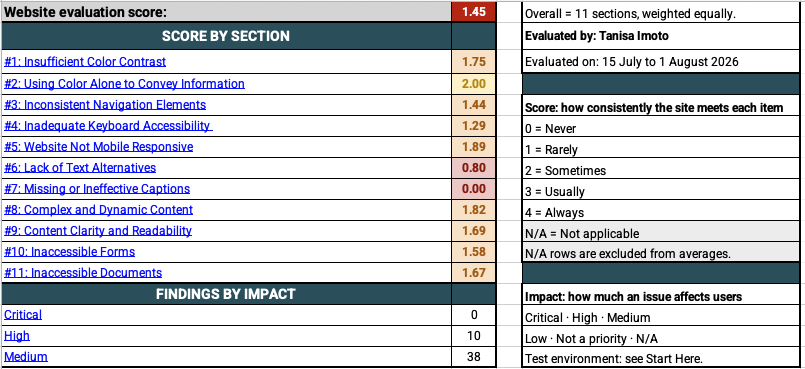
The workbook Summary tab, showing an overall score of 1.45 across 11 barrier sections, with 0 Critical, 10 High, and 38 Medium findings.
The overall figure averages eleven sections weighted equally. Evaluated by Tanisa Imoto, 15 July to 1 August 2026. The tab also shows the score legend, running from Never (0) to Always (4) with N/A excluded from averages, and the impact legend.
| Section | Score |
|---|---|
| 1. Insufficient Color Contrast | 1.75 |
| 2. Using Color Alone to Convey Information | 2.00 |
| 3. Inconsistent Navigation Elements | 1.44 |
| 4. Inadequate Keyboard Accessibility | 1.29 |
| 5. Website Not Mobile Responsive | 1.89 |
| 6. Lack of Text Alternatives | 0.80 |
| 7. Missing or Ineffective Captions | 0.00 |
| 8. Complex and Dynamic Content | 1.82 |
| 9. Content Clarity and Readability | 1.69 |
| 10. Inaccessible Forms | 1.58 |
| 11. Inaccessible Documents | 1.67 |
Findings by impact: Critical 0, High 10, Medium 38. The list is cropped after Medium, so Low and Not a priority are outside the frame.
Barrier 7 reads 0.00. This average is the result of three scored rows where most items were not applicable. Therefore, barrier 7's score is less reliable than one drawn from a fuller section.
The scale shown runs to 4, and the highest score this evaluation could award was 2.04. The 196-Item Instrument explains why.
My own record keeping posed a limitation to this evaluation. My documentation standard requires an evidence log, which records each observation with the value measured, the command that produced it, and the conditions at that time. Scoring findings without it delayed catching three of the five retractions described in The Retracted Findings.
More on scope and results
The evidence log came into existence after this evaluation project and now opens every one. Each observation is captured with its page, the value measured, the command that produced it, and the conditions at that time, and scoring happens afterward from that record. This log emerged from and will help to prevent cases like the three delayed retractions in future evaluations.
One of the nine corrections was a missing row instead of an error. Thirty-seven controls on the website announce a name that differs from their visible text, which stops a voice control user from speaking the words printed in front of them. The instrument has no row for that requirement, so the finding went onto the closest available row with a note saying the row is a substitute.
Two rules became standing practice.
- Confirm an artifact is the one that shipped before measuring it.
- Check whether an accessibility feature is part of the framework before scoring it as a developer's defect.
Remediation Priority
A score and a finding count tell an organization how it is doing. Reading consistency against impact is how the instrument answers where to begin.
The ten High findings come from five decisions that appear in ten places, and each of these five sits in a shared component or a shared setting. One correction therefore reaches every page that hosts the failure.
| Priority | The opportunity | The fix |
|---|---|---|
| 01. The main menu | Four of the five main sections cannot be opened without a mouse. The page also does not offer a way to skip past the navigation | One shared header component, plus one skip link |
| 02. Image descriptions | Roughly 22 images announce a filename instead of a proper description | One content-system setting, then the published images one at a time |
| 03. Hidden labels | 37 links and controls announce a name that differs from the words printed on them | Shared header, member strip, and footer components |
| 04. Form errors | A failed submission does not produce an announcement, which prevents a member from learning why the sign-in was refused | One shared form component, correcting every form at once |
| 05. The annual report | A 45-page publication lacks the internal structure a screen reader needs | The export pipeline, then the file |
The Repair Order
Priority 05 covers 45 pages and the work begins at page 13. The reading order pairs each board member's name with someone else's biography, causing a screen reader to state something false about a named person. The remaining pages follow by impact.
The Security Exemption
Two rows concern sign-in messages that withhold which credential failed. A developer reading the row alone would name the failed credential, which confirms to an attacker that an account exists. WCAG 2.2 permits the omission based on this exact scenario. As a result, both rows record the exemption and the message remains intact. Recording the reasoning keeps a passing score from reading as an oversight.
Solid Foundations
The website rests on solid foundations. Body text meets the readable size baseline throughout, media stays silent until a member starts it, the layout survives 200 percent zoom and a reader's own text settings, and both error messages describe a condition instead of blaming the member. Beyond those four, 54 of the 100 Low findings record a check the website already passes.
Ten High findings. Five decisions.
More on the remediation priority
Describing 45 pages of images in the Annual Report PDF follows this order:
- The cover, which contains three untagged figures and whose title and year reach a screen reader only through the document properties
- The membership chart, as the only data graphic, with three counts that already appear beside it as text
- Portraits of named people
- Partner logos
Every remaining decorative figure is marked as an artifact, which removes it from the reading order and prevents an unlabeled stop.
The file was produced in a design tool that lacks alternative text controls for several of these element types. This means a repair made afterward in a PDF editor disappears the next time the source is exported. An organization planning a further edition should therefore fix the export process first. An organization publishing this edition alone should repair the file.
Seven observations fall outside WCAG entirely, and three of them come before Priority 01. Two concern personal data and one concerns session security. Each of the three is recorded by the field it affects. Every document from this evaluation, including the internal one, names the field without recording what it contained. The remaining four are condensed into the client appendix of the client report.