← Work · Local-first application · Privacy by design
Editabl
A local-first PDF form filler and editor that runs in the browser on a person's own machine, built entirely by directing Claude Code and tested with an encrypted official government form.
The Problem
Official forms arrive as PDFs and are often challenging to fill out. While some forms have fillable fields built into them, many are flat pages that do not accept a cursor. Government forms often arrive encrypted even when they do not ask for a password. This can break ordinary tools used to fill them out. As a result, a person is forced to use a common workaround that involves printing the form, filling it by hand, and scanning it back.
Given these challenges, the tool's requirement was to open difficult forms, fill them properly, sign them, save the work between sessions, and keep the whole document on a person's own device from open to export.
More on the alternatives
Current alternatives come with conditions. Paid desktop software asks for a subscription. A free online filler requires uploading the document to a stranger's server, which poses an information security risk. Moreover, documents like an immigration form ask for a name, an address, an employer, and a signature. Sharing this information with an unknown service to save a few minutes is not an ideal choice.
The Editor
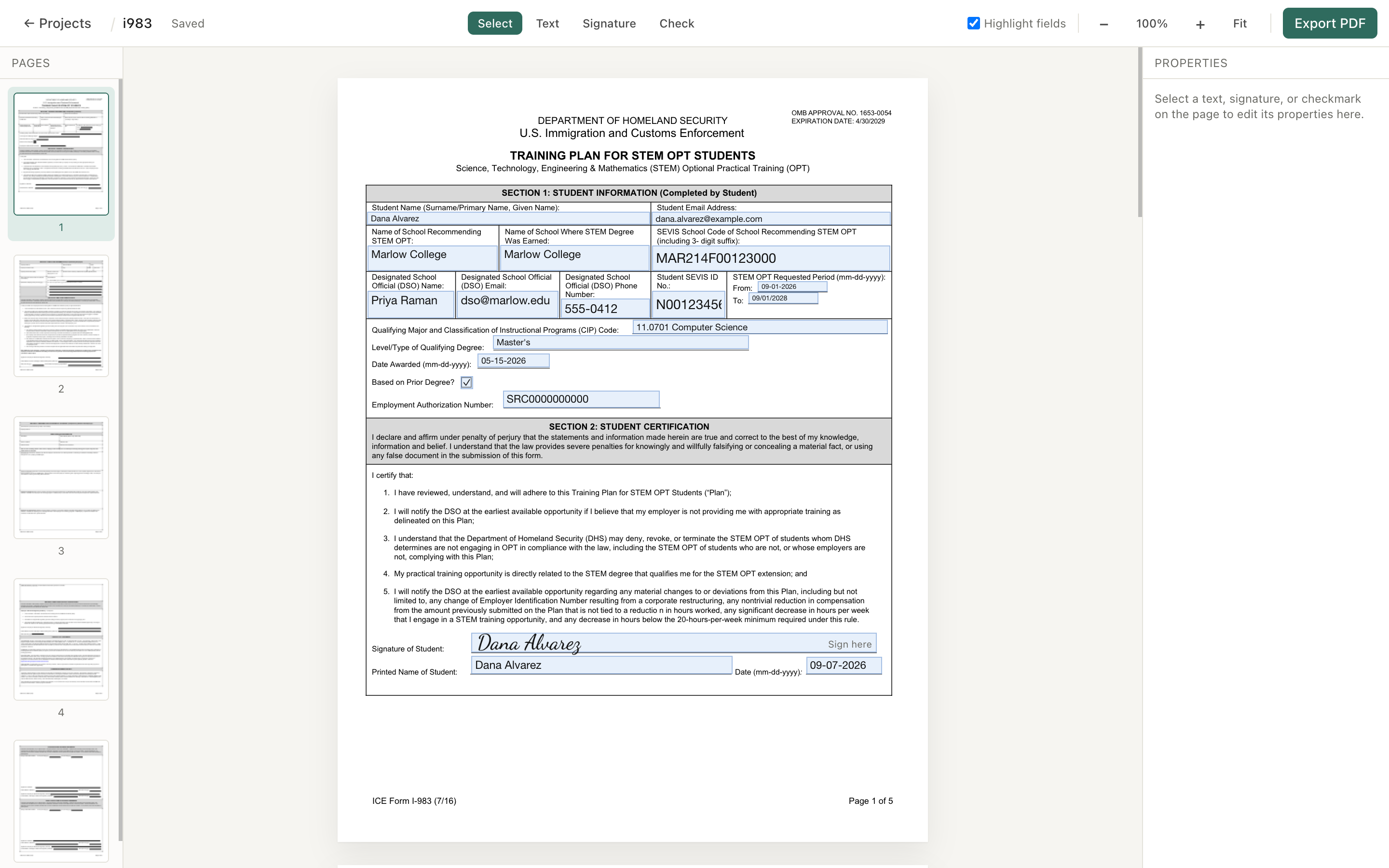
Editabl is built, deployed over HTTPS, and in use. It fills and signs PDF forms in the browser. A person opens a form, types into its fillable fields, places text anywhere on a flat page that has no fields, stamps checkmarks, and adds a signature drawn by hand, typed in a cursive font, or uploaded as an image. Every project saves automatically to the browser's own storage on the device, so reopening the app shows the work with thumbnails. Export produces a finished PDF with each addition baked into the page. Open the live tool.
Transcript
This is Editabl, open on an empty workspace. It fills and signs PDF forms in the browser, on my machine. The document stays on this device. I am opening a blank W-9. The first page loads in the center, and the page thumbnails line up down the left side. Editabl reads the fillable fields already in the form. I click into the name line and type, then move down to the address. Each entry appears inside its own field. The federal tax classification boxes are near the top. I click one, and a checkmark shows. The signature block is at the bottom of the page. I draw a signature by hand and place it. Typing one in a cursive font and uploading one as an image both work the same way. Export builds the finished file. Everything I added stayed as an overlay until this moment, and the export combines those overlays with the original page. The file lands in my Downloads folder. Opening it shows the typed entries, the checkmark, and the signature baked into the page.
The load-bearing design decision is the non-destructive edit layer. While the original PDF is never modified, every addition exists as an overlay in the app's own state, and they combine at the moment of export. A person can undo, move, resize, and reopen, and the source file never changes.
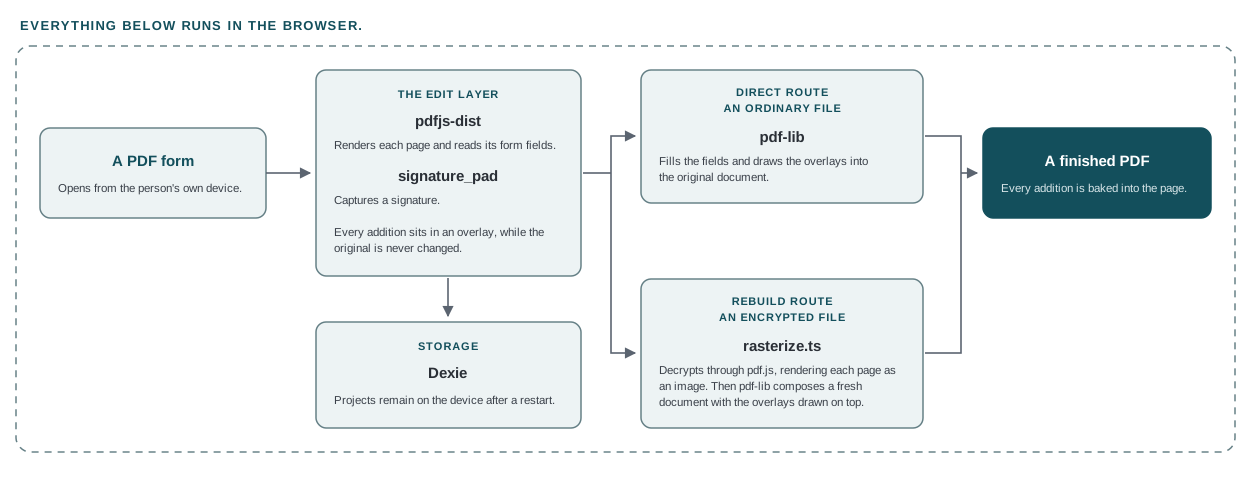
The application runs entirely in the browser. Three libraries do the document work, including pdfjs-dist which renders each page and reads its form fields, pdf-lib which writes the finished file, and signature_pad which captures a signature. Storage runs through Dexie on the device. Export runs on two separate paths, a direct route for ordinary files and a rebuild route for encrypted ones that goes through rasterize.ts.
One editor and two export paths
Export runs on two paths. An ordinary PDF takes the direct route, where
pdf-lib fills the fields and draws the overlays into the original
document. An encrypted PDF takes a second route through a helper called
rasterize.ts, which decrypts the file through pdf.js, renders each
page as an image, and composes a fresh document with the overlays drawn
on top. Splitting the paths kept the working export for ordinary files
clear of the encrypted rebuild's risk.
More on how it is built
Editabl is a single web application that runs entirely in the browser. React 18, Vite, and TypeScript form the app, with Tailwind for styling and Zustand for state. Because the server would introduce the exact exposure this tool seeks to avoid, there is no backend by choice.
Three libraries do the document work. pdfjs-dist renders each page to a canvas and reads the form-field metadata built into the PDF. pdf-lib writes the finished file, filling fields, drawing text and images, embedding fonts through fontkit, and flattening the result. signature_pad handles a signature drawn on a canvas. Storage runs through Dexie over the browser's IndexedDB, which easily holds whole PDFs and remain after a restart.
Privacy Decisions
This tool's architecture keeps everything on a person's own machine. There is no server, no account, and no upload step. The privacy requirement informed the architecture of this tool.
The ambition is a tool a person can hand a confidential form to without wondering who might gain access to it.
The newest feature, clear-all-data control involved a recon that
addressed the question: what does "all data" span? The results
identified a storage table for projects and another for saved
signatures, with no localStorage, sessionStorage, or persisted
settings anywhere. This means the wipe had a small and known target.
More on the clear-all-data control
A new function clears the projects table in a single transaction and clears the signatures table only when an opt-in switch is on. The confirmation is stronger than the per-project delete. It shows the count of projects to be erased and states that the action cannot be undone. It also offers an unchecked box for removing saved signatures, and requires the person to type a phrase, which activates the erase button.
The clear-all-data control addressed three questions: what the wipe preserves, how deep it reaches, and how one dialog serves both deletes. Saved signatures stay by default because this is the one piece a person reuses across projects. Moreover, wiping it on every erase would add a chore to every session. The wipe clears the two tables and leaves the database in place. Deleting the whole database is more thorough. However, the app has to rebuild the database afterward, and another open tab can block the delete. The shared confirmation dialog then gained two optional properties. This way a duplicate dialog does not drift from the original and the per-project delete keeps its original behavior.
Security
A third-party audit confirmed the app does not load anything from
another origin. This means a strict content policy would not break it.
Six security response headers and a Content-Security-Policy went into
vercel.json, shipped first in report-only mode. In that mode the
browser reports what a rule would have blocked without blocking
anything. The live site ran clean under report-only, and the policy
then flipped to enforcing. Switching on a policy at the first deploy
can blank out a site the moment it goes live.
Editabl applies security best practices and a privacy by design architecture. This is a defensible standard for a personal tool shared with family, and stops short of a certified-secure claim for other people's legal documents.
- Tests passing
- 46 of 46
- Security response headers, with an enforcing content policy
- 6
- Vulnerabilities in shipped dependencies
- 0
More on the dependency position
The dependency audit reported five vulnerabilities, graded three
moderate, one high, and one critical. Every finding traced to a
single root, the build tool esbuild, reached through the Vite
toolchain and the test runner. All five therefore live in the build
toolchain, which runs on my machine while I work. A second audit
limited to the packages a user downloads reported zero. The only
offered fix installs Vite 8, a jump of three major versions from Vite
5. I assessed that upgrade and deferred it to its own scheduled work.
While a personal tool can function without a linter, a tool built for other people's forms should have one. ESLint went in through a flat config with the two classic React Hooks rules specified by name. The result is a clean run.
Originality
I built Editabl by directing Claude Code across five phases and verifying every result myself. I scoped each stage, hardened the build prompt before it ran, reviewed each plan before a line was written, approved edits step by step, and performed visual gates. Only a person's eye can confirm the exact signature or checkmark location. The project demonstrates scoping, directing, and verifying AI-built software on a codebase where the worst failures pass the build and produce an export that only a visual check catches.
The primary test document for this tool was the ICE Form I-983, a five-page encrypted government form with a mix of fillable fields and flat areas. It provided common challenges faced during a PDF editing session. Verification centered on that one form. The evidence therefore covers the I-983 alone, so any other form type would need its own verification.
The bugs show the verification method more plainly than the features. Each of the worst bugs produced a result that looked correct. The redraw loop only appeared in the console. The missing typed answers only appeared in the saved file. The hollow checkmark passed all 46 tests. They were all identified by looking at the actual output.
More on the method and error discovery
The build ran across five phases. Phase I produced a working editor and found two hidden bugs. Phase II recovered signatures and rebuilt the encrypted export. Phase III made typed answers appear in the exported file and closed the last open items. Phase IV fixed two faults revealed by a demo on a smaller laptop. Phase V fortified the tool so that others can use it.
Before any code was written, I asked for the signature's positioning math and the new answer's positioning shown side by side. PDFs measure from the bottom-left corner and screens measure from the top-left. If the fix assumed one where the truth was the other, every answer would land flipped top to bottom, look correct in the code, and pass every unit test. The two matched, confirming the coordinate space before the first line. This one check prevented a rebuild of an upside-down output.
On export, every checkmark saved as a small hollow rectangle inside the checkbox. Both draw paths drew the check as a Unicode character through the embedded Noto Sans font. That cut of Noto Sans has no glyph for that character. When a font lacks a glyph for a character, the viewer draws a hollow box in its place, called the notdef box. The export tool completes and reports success. The fault passed all 46 tests and arrived in the saved file. The fix draws the check as two strokes with rounded ends and a minimum thickness, which takes the font out of the check.
Accessibility
Accessibility work on Editabl remains open. The tasks are:
- Ensure a keyboard path for every tool in the editor, including overlay placement and movement
- Route a screen reader to the form's own fields and announce each field's purpose
- Give the signature canvas a route that works without a drawing gesture
- Add focus management to the confirmation dialogs
- Check color contrast against the document behind the interface
- Test reflow at zoom