← Work · Local pipeline · Privacy by design
Notabl
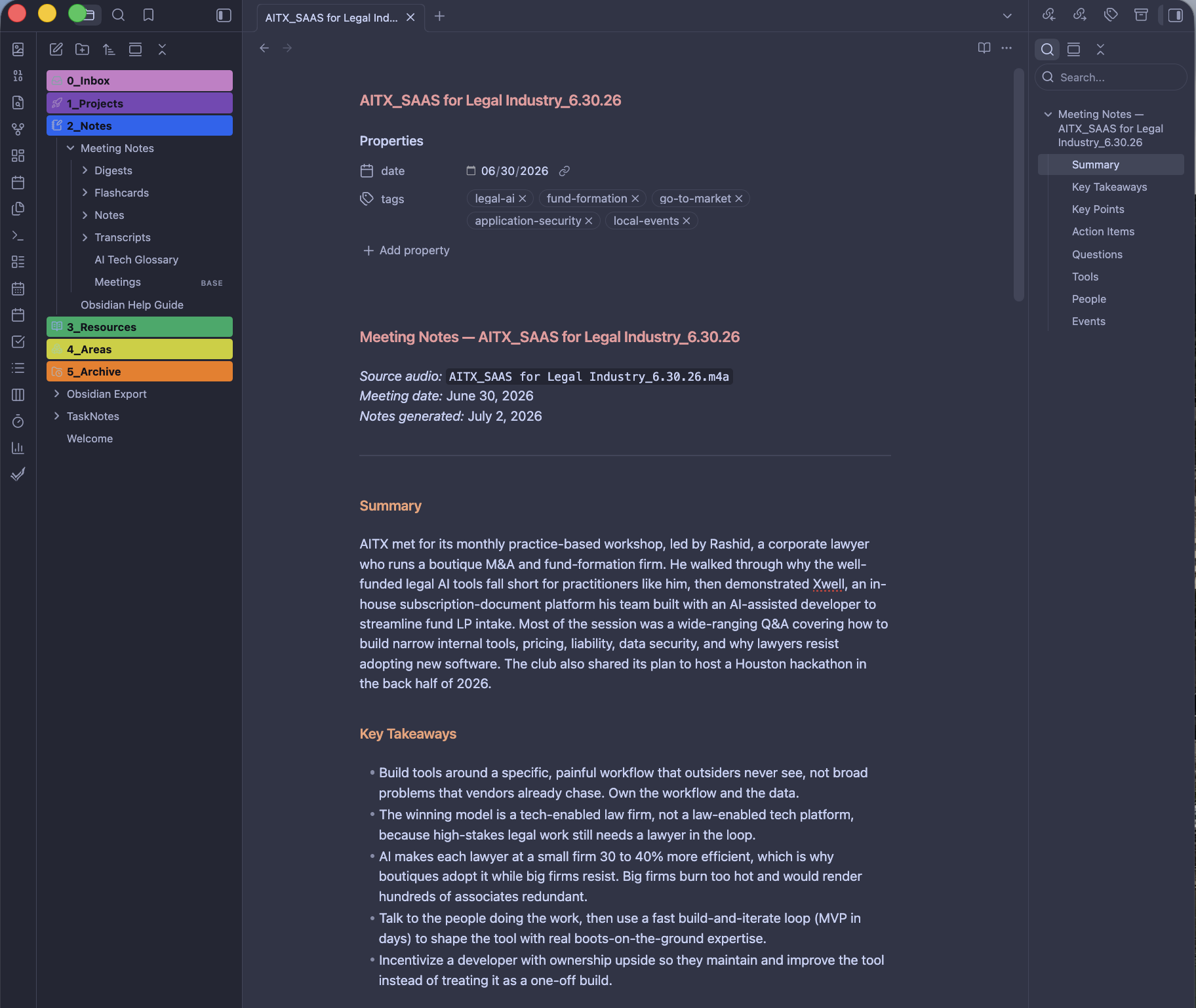
Notabl is a local meeting-notes pipeline that turns a recorded meeting into a structured note in an Obsidian vault, then keeps a glossary, flashcards, tags, and a monthly digest from those notes. The recording stays on the machine.
The Problem
An hour of recorded meeting contains a few minutes of useful information spread across the whole hour. Finding the relevant insights is challenging and requires several playbacks, and whatever goes unwritten is lost. I needed a set of notes in my own voice, structured enough to scan from that hour.
The obvious fix is a transcription and summary service. That also means a subscription, an account, and every meeting uploaded to a company's servers, where the recording is out of my control.
A Note in My Voice
A generic summary also reads as exactly that. It uses phrasing I would never use and it flattens the specifics. Notes I would return to had to sound like me and carry enough structure to scan, so a service that writes in its own voice fails the goal before privacy enters the question.
More on the problem
Two requirements ruled out the obvious product.
Privacy was a design requirement from the start. Meeting audio and its transcript remain on the machine.
Voice was the second requirement. Adding my voice after the fact meant editing the prompt directly. Treated as ongoing work, each meeting I edit by hand becomes one more before-and-after example for the next run.
The Pipeline
I record a meeting on my phone and drop the file into a Google Drive folder that syncs to my Mac. One command runs the chain from there. Whisper transcribes the audio on the machine, Claude turns the transcript into notes written in my voice, and the finished note lands in my Obsidian vault, a note-taking app that keeps everything as plain markdown files on my machine.
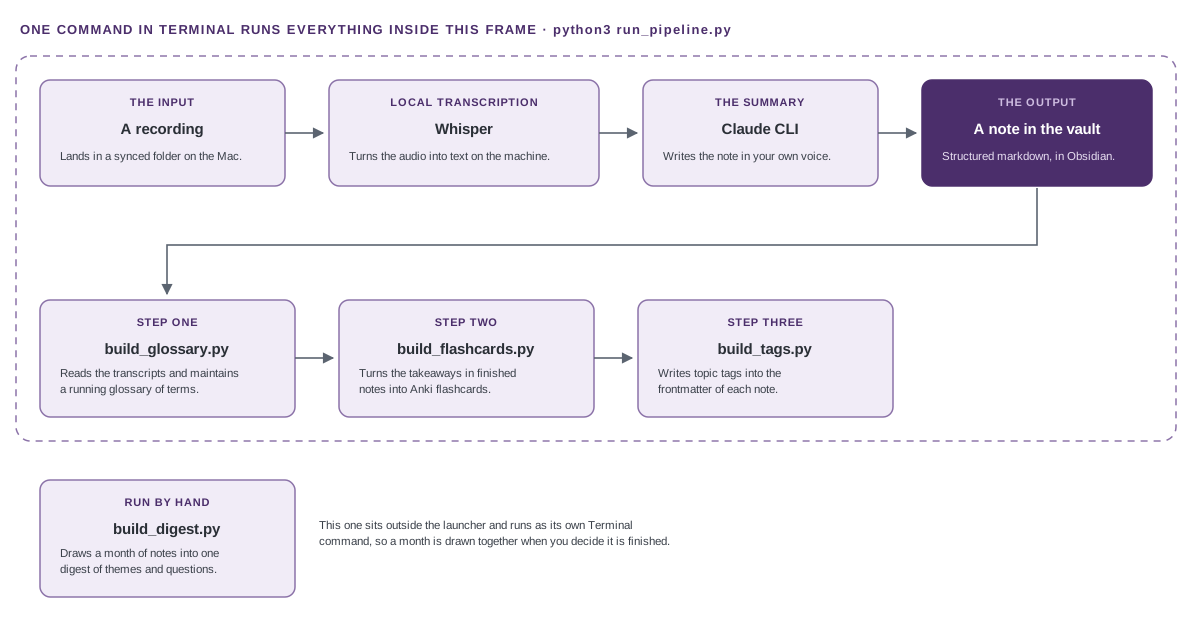
A recording lands in a synced folder on the Mac. Whisper transcribes it locally, then the Claude CLI summarizes the transcript into a structured note in the Obsidian vault. The audio never leaves the machine, and text goes out only where a model is needed. A launcher called run_pipeline.py scans for new recordings, processes each one, then runs three companion tools in a fixed order. build_glossary.py reads the transcripts and maintains a running glossary, build_flashcards.py turns finished notes into Anki cards, and build_tags.py writes topic tags into each note. A fourth tool, build_digest.py, draws a month of notes into one digest and stays a separate command you run by hand.
- Core script
- 1
- Companion tools
- 4
- Command
- 1
Companion tools read what the pipeline produces, and each one adds a layer. A glossary keeps a plain definition of every piece of jargon. Flashcards turn each note into a review deck. Tags make every note searchable in Obsidian. A monthly digest draws a whole month of meetings into one summary.
Everything runs on the Mac or through the Claude Max plan. The meeting audio stays on the Mac.
More on the pipeline
The core script, process_meeting.py, does the per-meeting work. It transcribes the audio locally, sends the transcript to the Claude command line with a structured summary prompt, and saves both the transcript and the finished note into the vault as cleanly named markdown files. Each note includes two labeled dates, the real meeting date read from the recording's filename and the note generation date.
The note template is built for scanning. A short Key Takeaways block opens the note and Key Points group under bold subheadings. Action Items tie to skills and Questions are numbered with their corresponding answers. A Tools table lists tool recommendations, and a People list covers presenters and notable experts.
Each companion tool reads the pipeline's output and adds one layer.
- The glossary scans the transcripts, asks Claude for a one-sentence plain definition of each piece of jargon, and folds the results into a single alphabetized file.
- The flashcards read the finished notes instead of the noisy transcripts, and they therefore inherit the importance judgment the summary already made. Where the model returns the wrong number of questions, the card falls back to the plain question instead of inventing one.
- The tagger edits the properties at the top of a note and leaves the body alone.
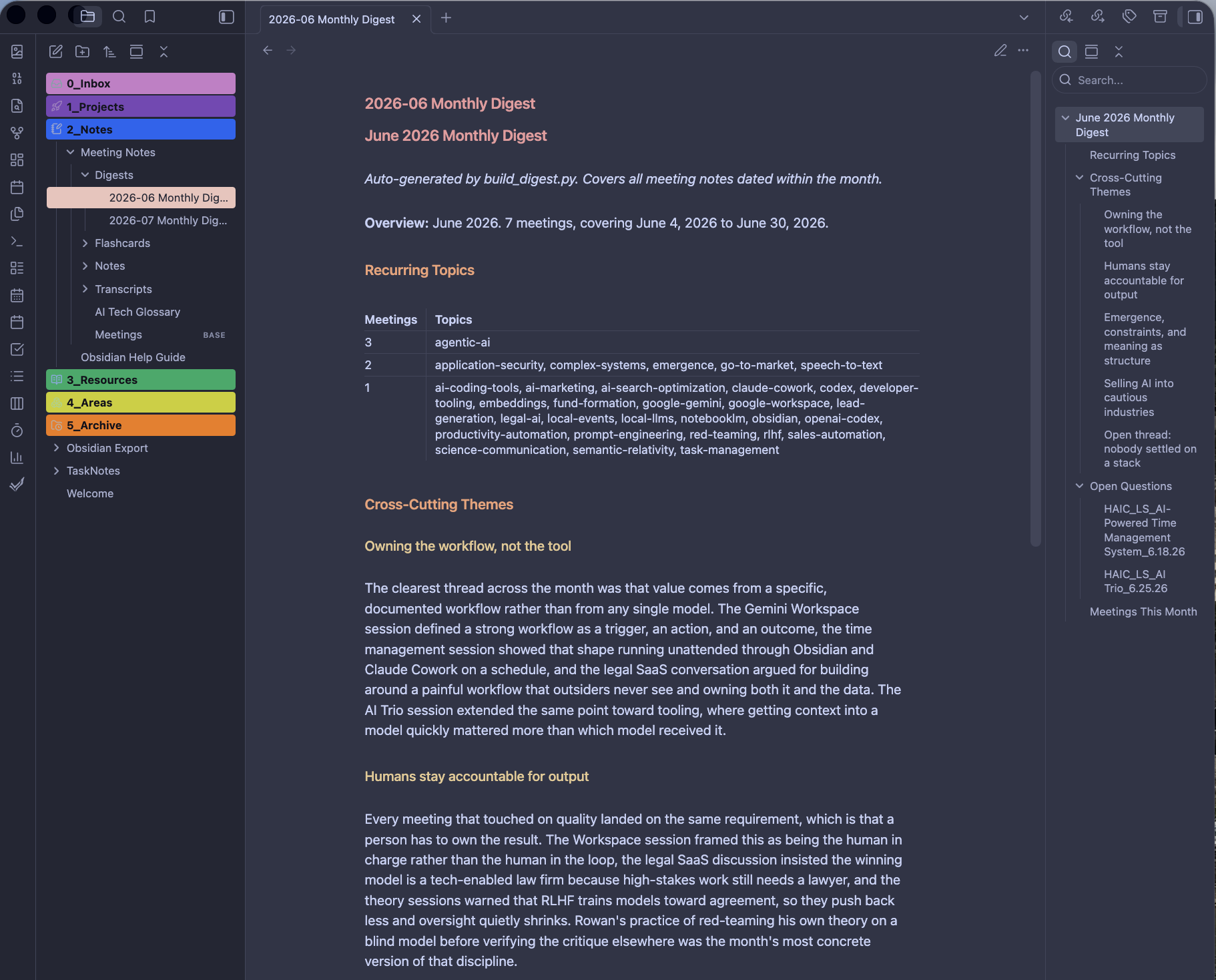
- The digest groups notes by their recorded date, counts tag frequency in code, and makes one model call per month for the cross-cutting themes.
The launcher, run_pipeline.py, initiates the pipeline as one command. It calls the four tools and the core script in order.
Code Verifies, Claude Writes
One rule applies to every tool. Code handles the work for accuracy, and Claude addresses the work outside of it. Whether an answer is verifiable determines which of the two does the work.
A fact has one right answer a computer can verify. Whether a term is already in the glossary, how many notes use a tag, and whether a tag runs longer than four words are all questions Python answers the same way every time.
Writing has no single right answer, so defining a term, distilling a takeaway, and establishing the themes across a month of meetings all go to Claude. A model returns something plausible when it cannot answer, which is the reason for this split.
More on the rule
The same instinct went to work on a different problem. The flat notes folder had grown into a scroll too long to browse, and the meetings needed grouping by category.
The tempting fix was a folder per category. Since every script locates notes by folder, that fix would have broken each companion's source path and the write path. The chosen design put the category into each note's properties, the small block of settings at the top of a markdown file. An Obsidian Base then groups the notes by that category. A Base is a view rather than a folder, so it leaves every file where it is and the scripts never notice it. The category came free from the filename prefix already in use.
The tagger was the first tool to edit notes that already existed, so the notes folder was duplicated before its first run. The reorganization that followed ran as two verified stages plus a cleanup pass. Each one confirmed on a live recording before the next began. Recon caught the single routing fault before the edit, since the glossary reads transcripts while the other companions read notes.
The cleanup pass closed a tagging fault where a fragment of the tool's own instructions had become a tag. The fix is a length guard in code, placed at the single point every tag passes through. One check therefore protects the note frontmatter and the tag vocabulary together.
Failures Without Notice
The pipeline's first test was a 71-minute recording. Whisper returned about 750 words where the meeting should have produced close to 11,000. Roughly the first five minutes were transcribed and the rest vanished.
The only sign of failure was in the transcript itself.
The second failure appeared while I was building the tagger. One date line was unable to read the real meeting date from the filename. When failing, it wrote the processing date instead without warning. This mislabeled the meeting. The tagger now reads the date in a safe priority order and warns instead of guessing. Additionally, the core pipeline writes two labeled date lines at the source.
Both were caught by reading the output against the recording.
More on the failures
The transcription loss traced to how Whisper keeps its context. Whisper works through the audio in overlapping chunks and passes each chunk's text forward to keep the next one coherent. The recording contained applause, and the model wrote repeated markers for that sound instead of words. Those markers were then passed into every later chunk, which repeated them. Everything after the applause was lost.
The three settings that fixed it were stop writing markers for non-speech sound, stop passing text forward between chunks, and break out of repetition sooner. The same recording then produced nearly 11,000 words, and the summary correctly identified the speakers, the products, and the key points from raw audio.
The medium model was the right size because meetings include several speakers, crosstalk, and jargon that smaller models garble. The medium English model at about 1.4 GB was therefore the choice over any lighter options.
Both failures produced output that looked complete. A crash announces itself, and a partial failure looks like a finished job. This is why the verification rule for the whole build went from testing a clean sample to testing on real material.
Scope and Results
I scoped each stage, gave Claude Code a kickoff prompt, reviewed its plan, and approved edits step by step. Every script ran from a plain Terminal so I could check the result against the actual files.
The pipeline is built, in use, and documented. It was verified end to end on the 71-minute recording described in Failures Without Notice, and several recordings have since run through the full chain and produced working notes.
The monthly digest is the one stage that depends on the model's judgment instead of reliance on code. I read its synthesis critically and tune the prompt as I go.
The Rejected Watch Folder
A service that runs the pipeline the moment a recording arrives was fully designed and then abandoned. Running unattended required Full Disk Access granted to a standing background process, and that broad, permanent permission outweighed its convenience. Almost all of that convenience came from avoiding four separate commands. A single launcher run by hand keeps it and runs under my machine's current and preferred permissions.
Claude Code cannot reliably reach the vault because it sits on a Google Drive cloud path outside what its restricted environment can read. As part of a second deliberate limit, scripts are built in Claude Code and run from a plain Terminal.
More on scope and results
Two boundaries remain open by choice. Notes recorded before the category stamp are uncategorized, and they gather in their own group in the Base until a one-time backfill stamps the whole set.
A separate piece of resilience work, allowing notes to move freely in the vault without breaking the pipeline, is scoped for a later phase.
The categorization work was verified on live output. The routing and the category stamp were confirmed on a fresh recording. The note landed in the Notes subfolder with its category recorded at the top and its transcript in Transcripts. A rebuilt month confirmed the split digest and produced the correct work file. The Base was built by hand in Obsidian.
Accessibility
Because Notabl produces markdown, the accessibility of its output is a matter of structure. Each note uses headings instead of bold text, the tools list is a table, and the questions are a numbered list with their answers. A screen reader can move through a note by heading, by table, and by list. The digest's recurring topics were reshaped from dense prose into a table for the same reason.
More on accessibility
Notabl does not have a screen of its own, so there is no keyboard pass and no screen-reader pass to report.
Notabl's output is read in two applications I did not build. The notes are read in Obsidian and the flashcards are reviewed in the Anki desktop app. Since the accessibility of each is the responsibility of the company that builds it, neither application was evaluated here.
Ultimately, structure has a limit. A well-structured note still depends on the accuracy of the summary.